Bookmark: https://frps.cn/14.html
Bookmark: https://www.spacesafe.top/archives/1557
服务端安装
https://github.com/Nyr/openvpn-install
生成配置文件
通过
bash openvpn-install.sh
生成客户端配置,管理客户端账号
1
2
3
4
5
6
7
8
9
10
| [root@dns ~]# bash openvpn-install.sh
OpenVPN is already installed.
Select an option:
1) Add a new client
2) Revoke an existing client
3) Remove OpenVPN
4) Exit
Option: 1
|
重启
systemctl restart openvpn@service
客户端下载
Windows客户端
Bookmark: https://openvpn.net/vpn-client/
将key和新建的client.ovpn放到C:/Program Files/OpenVPN/config目录下,到桌面双击openvpn图标即可。
Mac客户端
Bookmark: https://tunnelblick.net/
1.打开Tunnelblick;
2.点击左下角+;
3.我有设置文件;
4.OpenVPN设置;
5.打开私人设置文件夹;
6.将key和新建的client.ovpn放到此目录下。
Linux客户端
1
2
3
| yum install -y epel-release
yum install openvpn
openvpn --daemon --config client.ovpn
|
Android 和 iOS客户
app名称都是openvpn,苹果需要美区id安装
指定客户端IP
1
2
3
4
5
6
7
|
client server
gary,10.8.0.2
pc,10.8.0.3
|
远程办公
Bookmark: https://i4t.com/4961.html
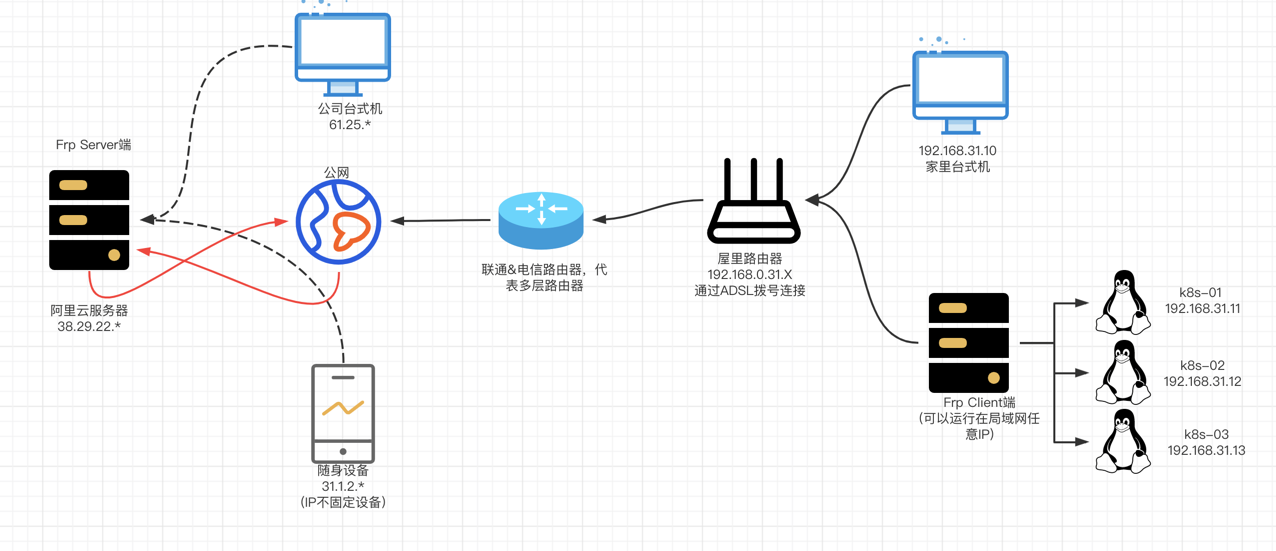
服务端的配置文件
vim /etc/openvpn/server/server.conf
1
2
3
4
5
6
7
8
9
10
11
12
13
14
15
16
17
18
19
20
21
22
23
24
25
| local 192.168.31.4
port 1194
proto udp
dev tun
ca ca.crt
cert server.crt
key server.key
dh dh.pem
auth SHA512
tls-crypt tc.key
topology subnet
server 10.8.0.0 255.255.255.0
ifconfig-pool-persist ipp.txt
push "route 192.168.31.0 255.255.255.0"
push "dhcp-option DNS 192.168.31.4"
keepalive 10 120
cipher AES-256-CBC
user nobody
group nobody
persist-key
persist-tun
verb 3
crl-verify crl.pem
explicit-exit-notify
|
开启内核路由转发功能
1
2
| echo "net.ipv4.ip_forward = 1" >>/etc/sysctl.conf
sysctl -p
|
如果有iptables可以开启iptables策略
1
2
3
| iptables -P FORWARD ACCEPT
iptables -I INPUT -p tcp --dport 1194 -m comment --comment "openvpn" -j ACCEPT
iptables -t nat -A POSTROUTING -s 192.168.31.0/24 -j MASQUERADE
|
启动openvpn服务
1
2
| $ cd /etc/openvpn/
$ /usr/local/openvpn/sbin/openvpn --daemon --config /etc/openvpn/server.conf
|
检查服务
1
2
| $ netstat -lntup|grep 1194
udp 0 0 192.168.1.8:1194 0.0.0.0:* 1499808/openvpn
|
重启服务
1
2
3
4
5
| ps -ef | grep openvpn
nobody 1499808 1 0 12:03 ? 00:00:00 /usr/sbin/openvpn --status /run/openvpn-server/status-server.log --status-version 2 --suppress-timestamps --config server.conf
root 1565270 1546382 0 14:35 pts/1 00:00:00 grep --color=auto openvpn
kill -9 1499808
/usr/local/openvpn/sbin/openvpn --daemon --config /etc/openvpn/server.conf
|
frp 穿透
通过京东云,公网ip地址是 116.198.255.163
京东云(**轻量云主机 2核4G 5M**)到期时间:2027-06-18 23:59:59
http:/116.198.225.163:4000/
⚠️问题:
1、windows连接vpn后,无法访问外网;
修改客户端配置文件(如果不行的话,检查一下自己家里的网是不是 192.168.31.x网段,是的话错开)
Bookmark: https://www.joshua317.com/article/82
Bookmark: https://www.xxshell.com/1760.html